Know where
your time actually went.
A compiled C++23 binary that watches your active window, every 50ms, all day. One string. Written locally. No accounts. No telemetry (unless opted-in). 100% offline core by default.
*0 by default
"HPR is an excellent tool for time management on Linux! It far outweighs any other option available and is developing very quickly! I highly recommend it!"
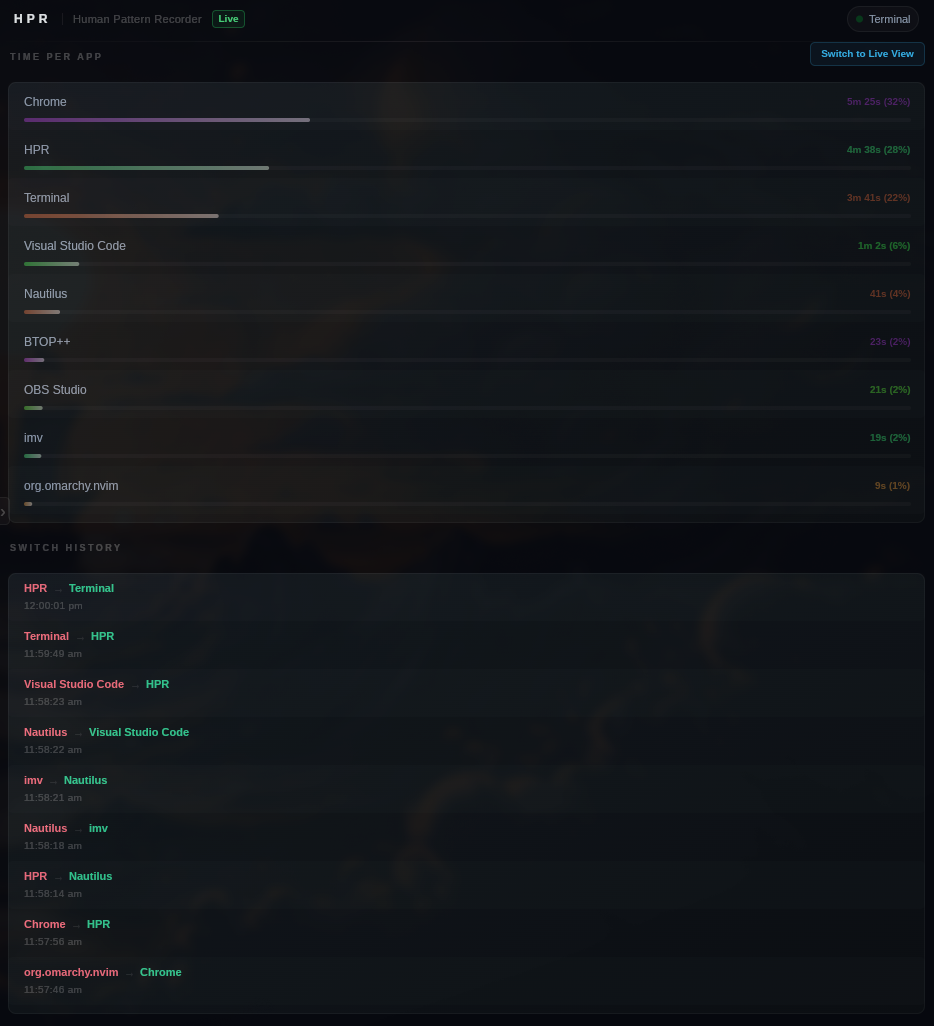
Three things, live, all day.
You open your computer. You work. Hours pass. You have no idea where they went. HPR fixes that.
Current Focus
What you are in right now, updating in real time. Every window switch detected in 50ms.
Time Per App
Total time per application today, displayed as 2h 14m 30s. Accurate to the second.
Switch History
Every transition, timestamped, in order. See exactly when you moved between applications.
VS Code Project Tracking
Tracks which VS Code project you're in — not just that VS Code is open. No extension. No plugin. No marketplace. HPR reads the window title.
App Limits & Goals
Set a daily time limit or usage goal on any app. HPR monitors usage in the background, sends a system notification when the limit is crossed, and can force-quit the offending app automatically.
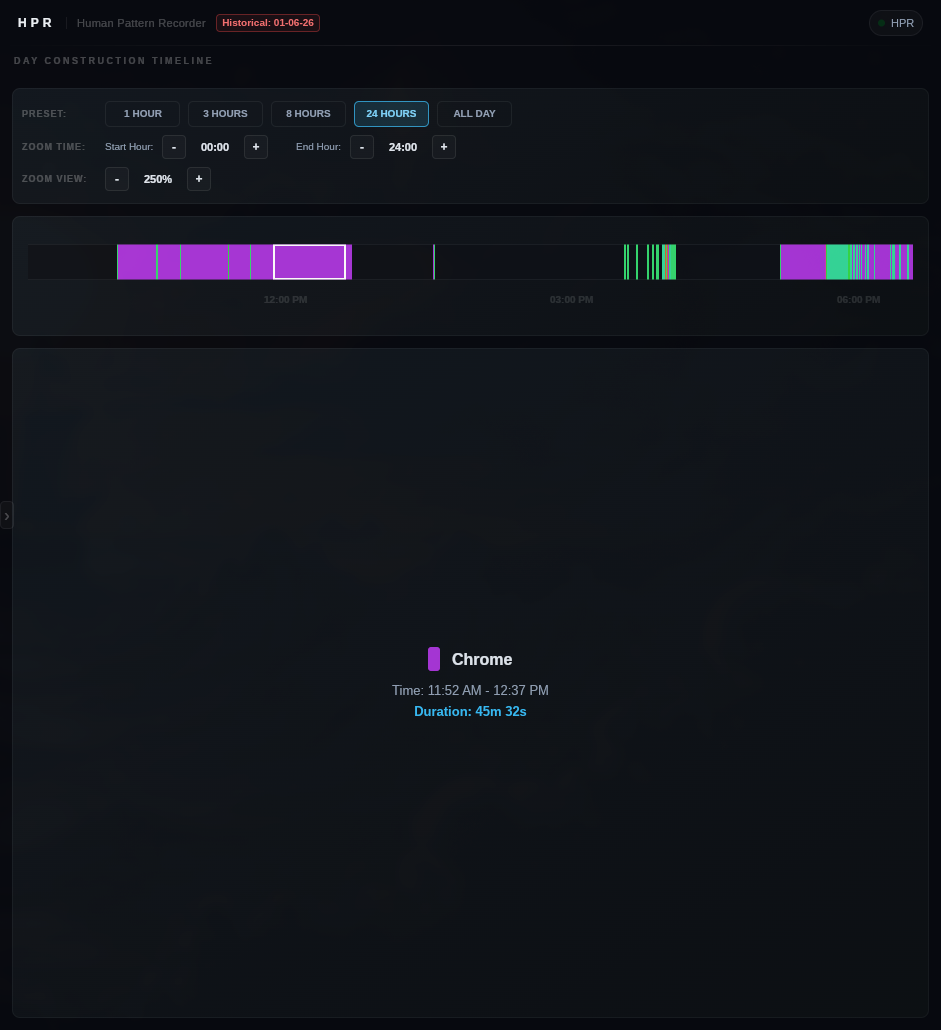
Day Construction Timeline
Maps window switches onto an interactive timeline canvas. Features zoom presets (1h, 3h, 8h, 24h, All Day), adaptive hour steps, hover details, and automatic downtime gap capping.
Advanced Pattern Analysis
Goes beyond daily stats. Processes localized historical files via multi-thread DB queries to extract 9 advanced metrics (escapes, dips, morning sessions, and weekend habits).
Edit the entire UI at runtime.
HPR's interpreted mode loads .slint files from disk at runtime instead of compiled-in UI.
Change colors, layouts, animations, and component structure — without recompiling. This is not a theme system.
It is a full UI runtime.
How it works
Enable interpreted mode
Set use-interpreter,true in config.csv. One line.
Edit app-window.slint
Modify colors, layouts, animations, add components. Full Slint language access.
Hit "Reload UI"
A single click in the sidebar reloads your changes instantly. No restart. No recompile. Changes are live in under a second.
// Enable runtime UI loading
use-interpreter,true
hardware-acceleration,true
// Linux
~/.config/HPR/ui/app-window.slint

// Windows
%APPDATA%\HPR\HPR_Config\ui\app-window.slint
Satisfying the UI/C++ contract is optional. HPR's C++ backend references structs, properties, or callbacks by exact name to push data into the UI. If you omit any properties or callbacks, the application will still load and run successfully, but you will not get their data or events. Do not rename the ones you do choose to use. A reference copy is always available in ui-REFERENCEONLY/ for diffing.
Dynamic, Sandboxed Lua Extensions.
Build dynamic widgets, advanced database views, custom logging handlers, and integrations using a secure,
isolated Lua 5.4 scripting VM. Fully integrated with C++ handles, real-time EventHub messaging, and SQLite.
The API is designed to be beginner-friendly — if you can write a simple Lua function, you can build an HPR extension. No compilation, no boilerplate, no framework to learn. Drop a .lua file into the extensions folder and you're running.
Extension Highlights
Interactive UI Callbacks
Register handlers using registerUiCallback. Pass nested structures (arrays, objects) dynamically from Slint UI triggers directly to Lua VM handlers as arguments (with a void return in C++).
C++ RAII Auto-Disconnection
EventHub subscriptions are bound to C++ connection tracking handles. They disconnect automatically when extensions are reloaded or unloaded.
Safe SQLite Queries
Interrogate tracking database records and perform calculations directly in sandboxed scripts safely in real-time.
Function Overriding API
Advanced users can go even deeper — intercept and override 28 core C++ functions directly from Lua. Rename windows, mock databases, block notifications, spoof time, hijack HTTP requests, and more. Read the Override API docs →
-- Subscribe to EventHub securely
HPR.connect("TICK", function(data)
    -- Direct database query
    local res = HPR.dbQuery("SELECT count(*) FROM active")
    print("Active tracking entries: " .. res[1][1])
end)
// Linux config path
~/.config/HPR/extensions/my_widget.lua

// Hot Reloading
// Save your script and HPR reloads it on-the-fly!
Exactly one thing. Nothing more.
HPR reads the title of the currently focused window. That's it. One string, every 50ms, written locally.
Compiled C++23 binary. Starts in milliseconds. Under 13MB of RAM on Windows. No Python runtime. No embedded web server. No subscription.
No accounts.
No telemetry (unless opted-in).
No analytics (unless opted-in).
100% offline core by default.

// HPR *does* have networking code inside the binary,
// used for opt-in anonymous telemetry, developer's YouTube Now Playing sync,
// and the Lua extension API. You can completely disable
// all network activity under the Settings panel.
Query any day. Any range. Any span.
HPR stores one SQLite file per day. From the sidebar you can pull up historical data in three modes — and your live tracking is never paused while it loads.
Single Day
Pick any specific date from the calendar picker. Loads that day's data asynchronously.
Last N Days
Pull the last 7 days, 30 days, or any number. Data from multiple daily files is merged and aggregated automatically—extremely fast using an N-thread query approach that avoids the 30s timeouts common in other tracking apps like ActivityWatch.
Date Range
Set a start and end date. HPR reads every daily file in that span and streams the combined result back into the UI.
Historical data loads on dedicated background threads using an N-thread approach (spawning threads to read files in parallel). Your real-time window tracking continues completely uninterrupted. Data is merged instantly, meaning you won't experience the 30s timeouts or interface freezes typical of single-threaded alternatives like ActivityWatch.
Day Construction Timeline.
Naive time trackers list your window usage as simple static numbers. HPR reconstructs your transitions chronologically on a beautiful, zoomable timeline canvas, resolving focus gaps automatically.
Timeline Highlights
Interactive Zoom Presets
Zoom into 1h, 3h, or 8h slices for microscope analysis, or zoom out to 24h and All Day views to see the macro patterns of your day.
Continuity Gap Capping
When HPR is closed or you shutdown your system, HPR caps the last active segment to a maximum of 1 minute upon transitioning to an Unknown state, preventing gaps from visually stretching.
Micro-interactions (Hover)
Simply hover over any block to see the application's details, active duration, and precise start/end range update in real-time in the status panel.
See HPR running.
Live window tracking, switch history, and the Insights engine — all running locally, zero accounts.
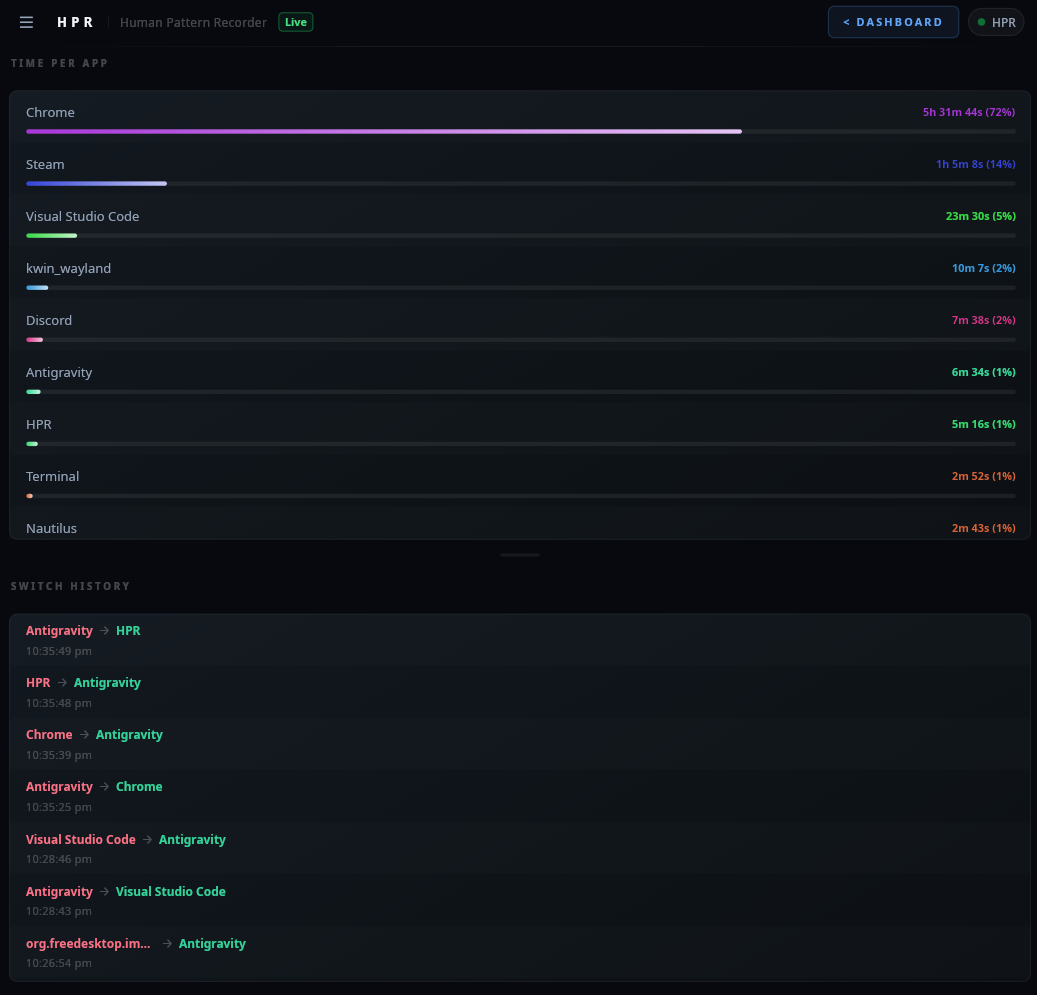
Home — Time Per App & Switch History
Timeline — Day Construction Canvas
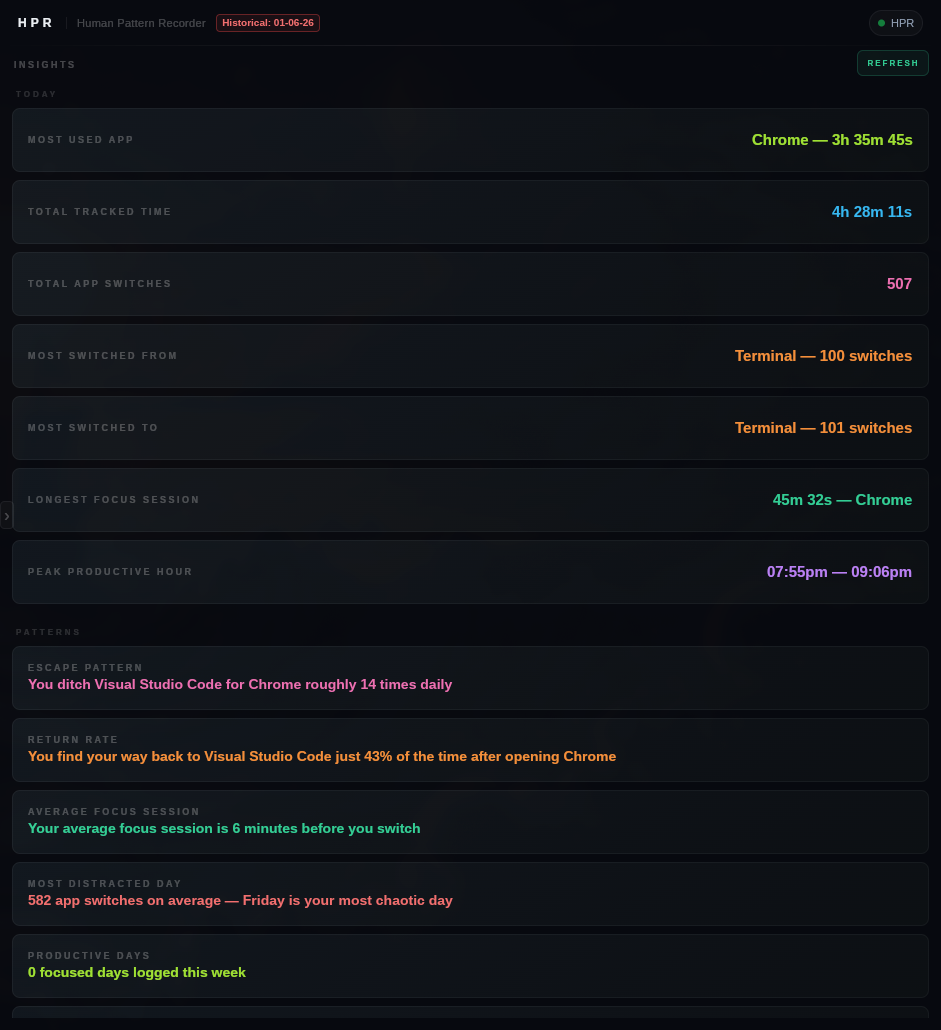
Insights — Pattern Analysis Engine
Live Demo — Window Tracking & Insights
Multi-threaded C++23.
12-14 threads active, out of which 4-7 are slint ui.
The stack.
C++23
Modern C++ with std::chrono, std::mutex, std::variant. Compiled binary, not interpreted.
Slint 1.16.1
Declarative UI toolkit. Compiled or interpreted mode. No Electron. No web runtime.
SQLite3
Official single-file amalgamation compiled into the binary. Zero external database dependencies. WAL mode with passive checkpoints.
Open source. Free forever.
The premium version has been merged into free. Every feature — current and future — available to everyone at no cost.